ClearTok Brings Bulk TikTok Repost Removal to Browser Extensions and Mobile Apps


Quick Answer
ClearTok is an independent TikTok repost remover that lets users bulk-remove reposted videos across devices through browser extensions for Chrome, Edge and Firefox and apps for iOS and Android. It automates repost cleanup with selective management, real-time progress, pause-and-resume controls and removal history export, and authenticates directly through TikTok without storing passwords.
The independent TikTok repost management tool combines browser extensions and mobile applications to help users manage and remove multiple reposted videos across devices.
Managing a growing history of reposted videos on TikTok can become a time-consuming task for users who want greater control over their social media activity. ClearTok, an independent TikTok repost remover, provides a dedicated solution for bulk repost removal through browser extensions and mobile applications, offering a more streamlined way to manage TikTok repost history across desktop and mobile devices.
Designed specifically for TikTok repost management, ClearTok helps users remove multiple reposted videos without having to manually navigate and undo each repost individually. The platform is available through browser extensions for Chrome, Edge, and Firefox, as well as dedicated applications for iOS and Android.
Simplifying Bulk TikTok Repost Removal
As users accumulate more reposted videos on their TikTok accounts, organizing and removing unwanted content can require repetitive manual actions. TikTok’s standard interface does not provide a native bulk unrepost function, leaving users to remove reposts individually.
ClearTok addresses this challenge with a dedicated TikTok repost remover designed to automate the repetitive steps involved in managing repost history.
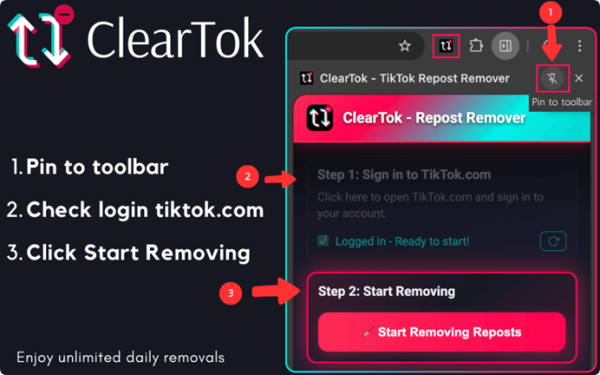
Through its browser extension, users can access ClearTok while signed into their TikTok accounts and initiate bulk removal operations directly within their browser sessions. The extension processes repost removal actions step by step and provides real-time progress information, allowing users to monitor and control the cleanup process.
For users who prefer mobile devices, ClearTok also offers applications for iPhone, iPad, and Android. These applications provide another way to review repost history, select content, and manage multiple repost removals.
By bringing its repost management capabilities to both desktop browsers and mobile devices, ClearTok provides users with flexible options for handling their TikTok repost history.
Features Designed Around User Control
ClearTok combines several capabilities intended to make TikTok repost management more accessible and efficient.
Key features include:
- Bulk Repost Removal: Process multiple TikTok reposts through an automated workflow rather than manually removing each item.
- Cross-Browser Support: Access ClearTok through supported browsers, including Chrome, Edge, and Firefox.
- Mobile Applications: Manage reposts using dedicated iOS and Android applications.
- Selective Repost Management: Review reposted videos and choose which recent items to retain before proceeding with cleanup.
- Real-Time Progress Monitoring: Track removal activity and view processing progress.
- Pause and Resume Controls: Maintain greater control over ongoing cleanup operations.
- Removal History Export: Export information about removed video URLs for personal reference.
- Open-Source Transparency: Review the browser extension’s publicly available source code through GitHub.
These capabilities position ClearTok as a specialized TikTok repost removal tool for users looking to simplify the management of large repost histories.
A Privacy-Conscious Approach to Social Media Management
Privacy and account security are important considerations when using third-party tools that interact with social media accounts.
ClearTok is designed to perform its core repost removal operations on the user’s device. Users authenticate directly through TikTok rather than providing their TikTok passwords to ClearTok.
For the browser extension, removal actions are initiated within the user’s browser session and sent directly to TikTok. The mobile applications similarly perform core account operations on the user’s device.
According to ClearTok’s published privacy and security information, the platform does not store TikTok passwords, session cookies, or copies of TikTok videos on its servers.
The browser extension’s source code is also publicly available on GitHub, providing developers and interested users with an opportunity to review its implementation.
This approach reflects ClearTok’s focus on user-controlled workflows, transparent product design, and privacy-conscious TikTok repost management.
The platform provides a free starting option, with additional plans available for users who need higher daily removal limits and expanded capabilities.
Users can explore the browser extensions, mobile applications, product features, and available plans through the official ClearTok website:https://cleartok.io
About ClearTok
The platform is designed to help users manage and remove reposted videos from their own TikTok accounts through browser extensions and mobile applications.
Available for Chrome, Edge, Firefox, iOS, and Android, ClearTok provides bulk repost removal, selective content management, real-time progress monitoring, pause-and-resume controls, and removal history export capabilities.
Learn more about ClearTok at https://cleartok.io/.
Brand: ClearTok
Website: https://cleartok.io/
GitHub: https://github.com/BrittAbdula/tiktokrepostremover
TikTok: https://www.tiktok.com/@_cleartok
YouTube: https://www.youtube.com/@cleartok
Instagram: https://www.instagram.com/cleartok