
Wondershare Announces Guide to Restoring Older Smartphones With Forgotten Passcodes


Wondershare has introduced an informational guide addressing forgotten screen passcodes on older smartphones, with an emphasis on restoration options, data erasure and account requirements that can affect device reuse. The guide covers computer-based restoration, remote erasure and Dr.Fone – Screen Unlock (iOS), while distinguishing screen unlocking from the separate account verification required by Activation Lock.
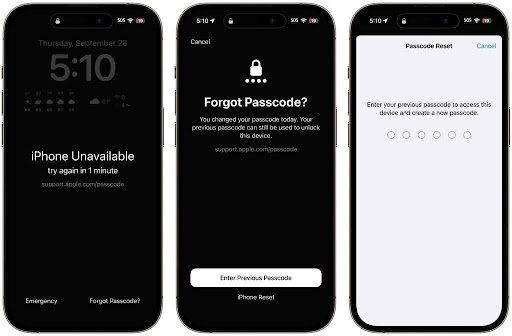
The guide focuses on devices that have remained unused for extended periods and whose owners no longer remember the screen passcode. Potential reuse scenarios include keeping a backup phone, passing a device to a family member or using it as a dedicated music player. Its central distinction is that removing a forgotten passcode does not necessarily resolve every barrier to setting up an older device again.
Device condition forms part of the guide’s initial assessment. The material discusses the phone’s model, physical condition, battery health and operating system compatibility before restoration. Older hardware or outdated software may limit support for newer applications. The guide also notes an access limitation: checking operating system information through the device’s settings requires unlocking the phone, which may not be possible at the outset.
One restoration option described in the guide involves a computer previously trusted by the device. Such a computer may recognize the connected phone without requiring a new approval on its screen. The guide explains that this route depends on the device and computer retaining the necessary trust relationship. If the computer instead requests an unlock or fresh approval, recovery mode becomes a separate restoration option.
The guide also addresses situations in which the original computer is no longer available. Recovery mode is presented as an alternative to a normal restoration attempt when a device cannot be accessed through the previously trusted connection. Across these restoration discussions, the material emphasizes the data consequence: restoring the phone removes its contents rather than providing access to the information previously stored on it.
Remote erasure is another method covered in the material. This option depends on access to the account linked to the device and on the relevant device-location feature having been enabled. The erase operation completes when the phone connects to the internet. Although remote erasure removes the screen passcode and local data, the guide states that it does not remove Activation Lock.
Account access therefore remains a distinct part of the restoration process. The guide describes circumstances in which an owner has forgotten both the screen passcode and the credentials for the account associated with the phone. Account recovery and manufacturer assistance supported by verifiable proof of purchase are identified as routes relevant to these situations. A reset alone is not presented as a substitute for resolving account ownership requirements.
Within the software section, Dr.Fone – Screen Unlock (iOS) is described as an option for removing forgotten numeric and alphanumeric screen passcodes. The documented workflow involves connecting the device to a computer, entering recovery mode, confirming the device model and operating system version, obtaining the required firmware and confirming the unlock operation. The process includes an explicit confirmation stage before screen unlocking proceeds.
The guide separates that screen-unlocking workflow from other account-related functions. It states that removing the screen passcode erases the phone and does not remove Activation Lock. This distinction applies even when software is used instead of a conventional computer restoration process. The material also treats account-removal and Activation Lock features as separate functions limited to supported devices and circumstances, rather than as universal capabilities.
Following restoration and resolution of any activation requirements, the guide describes device setup as a further stage. That stage includes account sign-in, creation of a new passcode and installation of an operating system version supported by the hardware. These setup considerations connect the restoration process with the proposed reuse scenarios without suggesting that every older device has the same software compatibility or physical condition.
The guide brings restoration methods, data-loss consequences and account dependencies into a single discussion. Its scope centers on reusing an older device after a forgotten passcode, not on recovering local information through screen unlocking. The distinction between access to the screen and permission to activate the device remains consistent across the methods described.
About Wondershare
Wondershare provides Dr.Fone – Screen Unlock (iOS), software with functions for removing forgotten device screen passcodes. The company’s informational material addresses restoration workflows, data erasure and account requirements associated with reusing older smartphones.